

Access Stack
Scan at the gate
One question at the gate: may this person come in?
A tablet at your gate that reads the QR code on an attendee's ticket, records the entry, and shows the result in large text.
Pushed to your tablets by your device management. Nothing for staff to install.
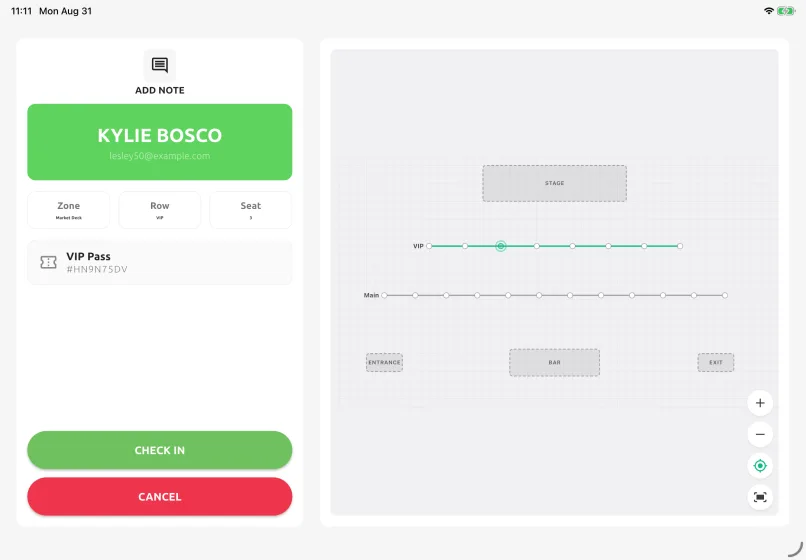
When the answer is yes it can print a name badge, show the attendee which table or seat they are going to, and let the operator attach a note to the ticket. When a ticket cannot be read at all — a dead phone battery, a lost printout — the operator searches instead, by name, company, email address, table number or ticket code.
Scans are queued on the tablet while the network is down and sent when it returns, so a network outage does not slow gate check-in. While the network is up, every scan reaches Event Base within a second or two — the organiser watching the live dashboard sees admission numbers update in real time, and so does every other gate.
Away from the gate, the ticket monitor is the live attendee list for the whole event rather than one gate: check-in progress, a filter down to who has not arrived yet, counts scoped to a single gate, and an export of exactly what is on screen. That is how an organiser gets a no-show list during the event without asking anyone to count.
How a shift goes
- 1The gate screen shows the event and the gate this tablet is assigned to. Tap Scan — or scan the ticket with a handheld scanner, if one is connected.
- 2The confirmation screen is large enough to read across a desk: the name, the ticket type, the table and seat, and the venue map with their table highlighted.
- 3Press Check In. That press is what records the entry, and it sends the badge to the printer where the event prints them.
- 4A refusal is a red banner with the reason — wrong gate, already used, ticket not confirmed. The operator cannot override those rules.
A forged ticket does not open the gate
Every ticket QR is an encrypted payload. Copy it, edit it or generate one and it fails to decrypt — the gate refuses it.
Who uses it
Gate operator
During the event, at the gate. Scan, read the answer, admit or refuse.
Stack admin
Before the event opens. Assign the tablet to the event and its gate, set the entry rules, test a scan.
Watching the numbers
On their own tablet, on the ticket monitor: who is in, who has not arrived, which gate still has a queue.
What you need
- A tablet with the app and a camera
- An event with ticket types and at least one gate
- Staff accounts with access to the event
- A Brother label printer, only if you print badges at check-in
- A handheld barcode scanner, only if a queue will move faster with a scanner than with the tablet camera
What you set up in Event Base
Gates, entry and re-entry rules, ticket types, the seating map, badge layouts and staff access.
Read the manual
What it does not do
A stack admin can tighten a rule on one tablet, never loosen one. Anything the organiser has switched off in Event Base stays off at every gate.
Re-entry is decided per gate, so the same ticket may be readmitted at one gate and refused at another. That is configuration, not a fault.
Seat Check mode records nothing. A tablet set up as a seat finder shows an attendee their table and counts no entry, and it only accepts tickets that have already been checked in.
Checking someone in by hand keeps the count right but loses the gate the entry was made at. Prefer a scan whenever a scan is possible.
Questions we get asked
- What happens if an attendee's phone is dead?
- The operator searches instead — by name, company, email address, table number or ticket code — and admits them from the result. Search covers every ticket type at the event, so nobody needs to know which one the person holds.
- Can we see who has not arrived yet?
- Yes. The ticket monitor filters the whole event's attendee list down to Pending, which late in the day is the no-show list, and exports it as a CSV. The same filter scopes to a single gate.
- Does the gate keep scanning if the network drops?
- Yes. Scans are held on the tablet and sent when the connection returns. While offline, you stop seeing updates from the other gates.
- Can a copied or forged ticket get in?
- No. Every ticket QR is an encrypted payload. Copy it, edit it or generate one and it fails to decrypt, and the gate refuses it.
- Do we need special hardware at the door?
- A tablet with a camera is enough. Add a Brother label printer if you print badges at check-in, and a handheld barcode scanner if the queue will move faster with a scanner than with the tablet camera.





Tell us what happens on your event day
We will work out which apps you need — and which you do not.