

Sales Stack
Track exhibitor revenue
Record each exhibitor's reported revenue.
At an event running on coins or tokens, visitors buy the currency centrally and spend it at the stands. Sales Stack records the amount each stand reports, linked to the right exhibitor.
Pushed to your tablets by your device management. Nothing for staff to install.
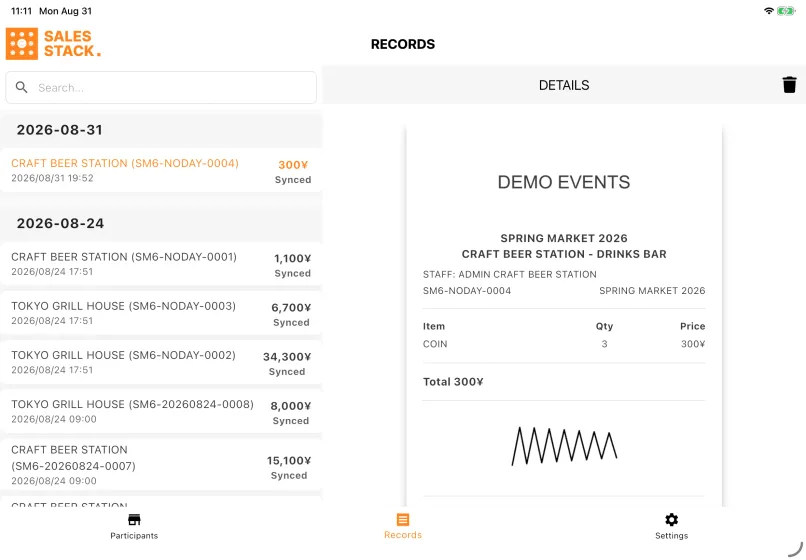
Pick the exhibitor — a Participant, in Event Base — pick the point of sale, tap once per coin, and have them sign for it on screen. One QR code does the first two steps at once: an exhibitor's code names both the seller and the stand, which is useful at a busy revenue desk.
Each entry is registered as a revenue on that exhibitor, converted at the rate the event set for the currency. It arrives in Event Base pending, and the exhibitor confirms it from their own portal afterwards — the tablet records the handover, and the exhibitor agrees to it later.
How a shift goes
- 1Pick the exhibitor from the grid, then the stand they are reporting revenue for. Scanning their QR code skips both screens.
- 2Tap the currency tile once per coin. The grid holds one tile per currency the event defines, not one per product.
- 3Read the total. It is in yen, not coins — the count multiplied by the rate the event set.
- 4Hand the tablet over and let them sign for it, then slide to confirm. That drag is the moment the entry is written.
It is not a POS app
No payment is processed, no change is calculated and there is no card reader. These figures are the exhibitor's reported revenue — what you use for settlement with them. The event's formal sales report comes from POS Stack.
Who uses it
Recording the handover
At the stand or the cash desk, recording what came in and getting a signature.
Reviewing settlement
In Event Base, reviewing revenues the exhibitors have confirmed and producing the settlement.
What you need
- A tablet with the app
- An event with at least one currency of its own and a rate for it — without one, Sales Stack is not offered for the event at all
- Exhibitors with a point of sale assigned. A sponsor with no stand does not appear on the grid
- Staff accounts with access to the event
What you set up in Event Base
Event currencies and their rates, exhibitors and the points of sale each one holds, whether a signature is required, and revenue approval.
Read the manual
What it does not do
An entry can be deleted while it is still pending, by anyone signed in. Once the exhibitor has confirmed it in Event Base, the delete button is gone and the correction happens there.
Every one of an exhibitor's points of sale is offered, not only the ones using coins, because an entry is recorded against a stand whatever that stand's own currency is. The right one still has to be picked.
Where the event tracks staff presence, a stand with nobody clocked in is marked OUT and cannot be tapped. Time Stack decides that, not this app.
These are the exhibitor's reported revenue figures, not the event's formal sales totals. The event's formal sales report comes from POS Stack.
Questions we get asked
- Is this the event's sales figure?
- No. It is what each exhibitor reports in the event's own currency, and it is what you use for settlement with them. The event's formal sales report comes from POS Stack.
- Who agrees the number?
- The exhibitor. The entry arrives in Event Base pending and they confirm it from their own portal, with the signature taken on the tablet stored alongside it.
- Does any money move through the app?
- No. Nothing is charged, no change is calculated and there is no card reader. The tablet records a handover that has already happened.
- Can a mistake be corrected?
- Delete it while it is still pending — anyone signed in can, and it does not need an admin. Do not register a correcting entry: that leaves two records where there should be one.
- Why can we not select one of our stands?
- Most often because the event tracks staff presence and nobody from that exhibitor is clocked in, which shows as an OUT badge on the tile. Otherwise the stand has no point of sale assigned in Event Base.





Tell us what happens on your event day
We will work out which apps you need — and which you do not.