

POS Stack
Sell at the booth
Keep selling at the booth, even when venue Wi-Fi drops.
A tablet at the booth that sells the products assigned to that booth, records payment, and prints or shows a receipt.
Pushed to your tablets by your device management. Nothing for staff to install.
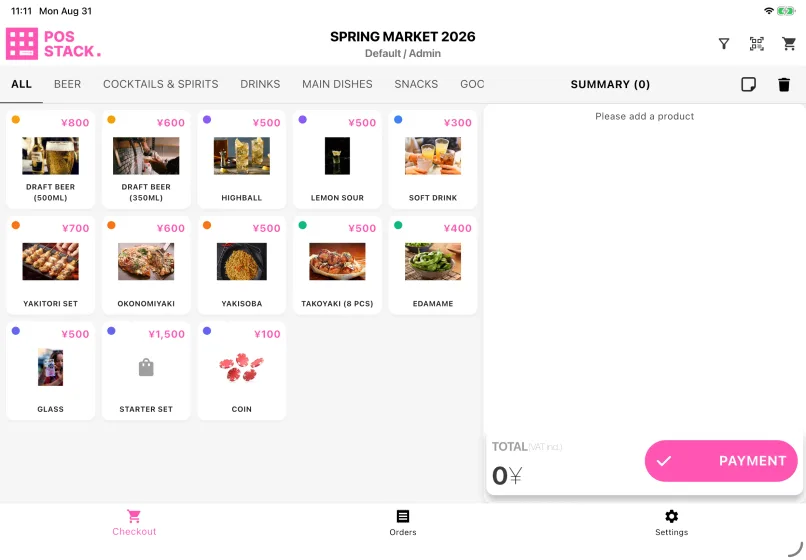
Scanning an attendee's ticket adds the matching ticket type to the cart, so a prepaid drink or meal is redeemed at the counter instead of being paid for twice. Each code counts once — scan the same ticket again in that cart and the second scan is ignored, which is what stops one ticket buying two drinks.
Every sale is written to the device first and synced afterwards, so a booth can keep selling through a network outage. Card and QR payments are the exception — those need the payment service to answer.
How a shift goes
- 1Tap the products. The cart builds beside the grid, with the total marked VAT included.
- 2Tap Payment and pick how they are paying — cash, card or QR code. A cash-only lane shows one tab.
- 3For cash, enter the amount received. The screen calculates the change, so nobody has to do it at the counter.
- 4Slide to complete. The slider stays locked until the payment method confirms payment.
- 5Print the receipt, or show the QR code the customer reads on their own phone, and tap Complete for the next person.
Cancelling a sale needs approval
An operator cannot cancel a sale alone. Either an admin is signed in, or a supervisor approves it with their own QR code and PIN. Where the payment service cannot return the money automatically, the button reads Cash Refund instead — the order is cancelled and you refund the customer yourself. Cancelling never deletes an order; it stays on record.
Who uses it
At the booth
Sign in, pick the booth, and sell all day.
Setting it up
Assign the tablet to an event and a booth, set the printer and the tax rate, and check it before the event opens.
What you need
- A tablet with the app and a network it can reach the internet through
- A point of sale — a booth — with products assigned to it
- At least one payment method enabled on the event, or the app will not open the booth
- Staff accounts that can reach the event
- A receipt printer, only if the booth issues printed receipts. A digital receipt shown as a QR code needs no hardware
What you set up in Event Base
Points of sale, products and prices per booth, currencies, tax rates, payment methods, whether checkout asks for anonymous customer demographics, and whether it offers a digital receipt.
Read the manual
What it does not do
Card and QR payments need the network. Cash sales can continue without it — so a lane that can still take cash but nothing else means the payment service or connection is down, not the tablet.
A tablet admin can switch a payment method off on one device, for a cash-only lane, but can never add one the event does not allow.
Test mode is not a rehearsal for money. The sale is filed as a test and stays out of the event's sales totals, but a card is really charged and cash really changes hands. An orange banner across the payment screen says so.
The receipt printer and the fallback tax rate are per-device settings rather than event ones, so they are set on each tablet.
Questions we get asked
- Does POS Stack keep working if the venue Wi-Fi goes down?
- For cash, yes. Sales are written to the tablet first and sent afterwards, so the booth can keep selling and nothing is lost. Card and QR payments need the payment service to answer, so those stop until the connection returns.
- Can an operator cancel their own sale?
- No. Either an admin is signed in on that tablet, or a supervisor approves the cancellation with their own QR code and PIN. The order is never deleted — it stays on record as cancelled or refunded.
- Can one prepaid ticket be redeemed twice?
- No. Scanning a ticket adds whatever it grants to the cart, and scanning the same code again in that cart is ignored.
- Do we need to buy card terminals?
- Only if you take cards. Cash needs nothing beyond the tablet, and a digital receipt is a QR code the customer scans, so a booth can sell with no hardware beyond the tablet itself.
- Can different booths take different payment methods?
- Yes. The event sets the master list, and a tablet admin can narrow it further on one device — a cash-only lane at a busy bar, for instance. No device can add a method the event has not enabled.




Tell us what happens on your event day
We will work out which apps you need — and which you do not.